Welcome to Delicate template
Header
Just another WordPress site
Header

It’s not going to be a technical post.. just some “share moment” post from my experience :)

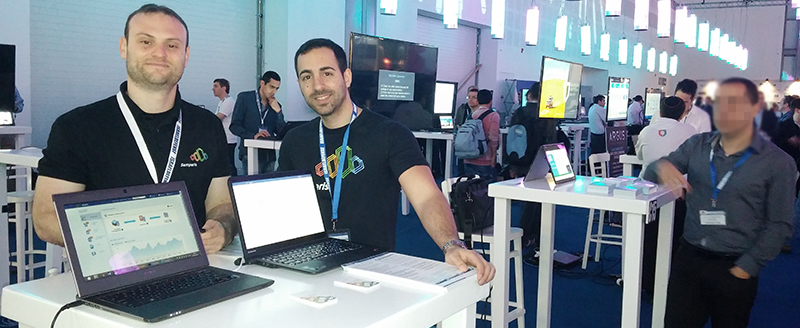
I had the honor to participate two conferences of Microsoft Techdays in Israel, the first one was about Orchestration with System Center Orchestrator – “The Orchestration Revolution” (4/3/13), me and my friend Tal Shaham (Microsoft IL) lectured about the new abilities that Orchestrator brings to the organization, I had a great demo which demonstrated a live working Runbook with my own developed Integration Packs (Robocopy & Dynamic Vars).

Sharon Abarbanel Tal Shaham

The second lecture (20/5/13) was about “Debug Production Application Issues using System Center Operations Manager“, me and my friend Yaniv Shmulevich (Senior PFE @Microsoft IL) lectured about DevOps, APM and TFS synchronization. every parameter of the configuration wizard of APM was explained (Performance monitoring, Methods & Namespaces Monitoring, Similar & Related Events, etc.). We had a demo with “homemade” application which demonstrated Server & Client side exceptions. We showed how to assign these alerts\exception to TFS and how we can see it within the AppDiagnostic, AppAdvisor, etc.

Sharon Abarbanel Yaniv Shmulevich

Link to the above lecture’s presentation – Debug Production Application Issues using System Center Operations Manager

Well, it’s been a pleasure to take part and to serve the IT community of IL, this post was a short summarizing of the events.

A short interview (in hebrew) I did about IT Orchestration… Could be read here.

Have fun :)

MPViewer got updated (2.2.2)

April 30th, 2013 | Posted by sharon in Miscellaneous | OpsMgr - (0 Comments)

Generally, I’m trying not to write about updates and news, just about things nobody else writing about, but in that case I think its very helpful that my readers will get noticed – a new Version of MPViewer is out, quoting from the original site:

[Updated on April 26th 2013 with MPViewer 2.2.2 that contains a fix for some rules in the IIS MP that were incorrectly being reported as not generating alerts, and another fix for the "unseal/unbundle" menu item that sometimes was not being enabled]

Well, not a deal breaker fixes, but still… Could be downloaded from here


Have fun !

A short tip I recorded for ‘TechNet IL’ about right and wrong ways to design a runbook for fast results.

Hope you’ll like it… for my international readers, sorry – it’s in Hebrew.

Watch it


Have fun ! :)

Smartphone

The below solution is served to you as an overall idea. In the real-life solution I added more conditions and logic to the Runbooks, I hope you will find this idea useful for you.

Let’s imagine a scenario;

It’s Friday night, you dining in a nice restaurant… taking your first bite and then – you getting an email from your monitoring system (Operations Manager for an example).

Arrrr, it’s again this LUN that got full, now your production DB is down, you know what the procedure is for this incident; Login the Server, navigate to the mapped drive and delete the buffer file which acts as a placeholder for scenarios like this.

So… you pay for your meal and drive back home as fast as you can to deal with the situation – not a happy ending for a supposed to be nice evening!

So, we have a well-known situation, a monitoring system which tell us we have a problem and an email system that available for us from anywhere, what if we could just combine these components together to one fully automated solution ? We have well-known problem – a LUN that got full and SQL services that went down as a result and we have an alerting mail that was sent to our smartphone (Windows Phone, Android, IPhone, etc.).

By insert Orchestrator into this equation we could automate our recovery tasks for incidents like we talked about, automation is not enough, we need control too. I don’t know any admin that would want to delete files or expand LUNs automatically without any control or supervising – that’s where our smartphones comes in.

My solution includes the above systems:

  • System Center Operations Manager (Could be any other monitoring system that integrated with Orchestrator).
  • System Center Orchestrator 2012 SP1 with the following not default Integration packs:
    • System Center Operations Manager – ops
    • Exchange User – xch
  • Exchange Server (for sending & receiving the mails) – some dedicated mailbox should be created.

With the following integration packs I have to build two Runbooks, first Runbook which monitors the Operations Manager Alerts (let’s call it Auto_Trigger_By_SCOM) and second which monitors our dedicated mailbox for new mails (let’s call it Auto_Trigger_By_Mail).

The scenario is simple: when an alert is generated about our full LUN, the Auto_Trigger_By_SCOM Runbook triggered and sends mail to you – the IT guy. The mail is sent by the user of our dedicated mailbox. All the needed information should be in that mail for you to understand what is all about.  After you took a moment to think about that, replying that mail with some “Magic word” should trigger the Runbook which solving the problem by deleting the buffer file, how? By the Auto_Trigger_By_Mail Runbook that monitors our dedicated mailbox for new mails, it analyze the replied mail and execute (or not) the rest of the Runbook, this way, you can control your executions and recovery tasks without stop eating your great meal J

workflows

As the group’s Manager, I’ll upload under the Tag “User Group” content related to the User Group, my readers are from all over the world so I’ll make a note that the content I’m uploading under this tag is in Hebrew.

As for now, I’m including the links to the presentations from February and March:

Feel free to join our community at www.facebook.com/ms.infra.mng.usg

Enjoy !

I’ve upgraded customer’s Orchestrator to SP1… with the SP1 I also reinstalled the Integration Pack of Operations Manager to SP1 version.
note: the customer’s Operations Manager is 2012 (without SP1).

I’ve checked the integration pack (2012 SP1) on my Operations Manager (2012) and everything worked fine… not !
The Start\Stop Maintenance mode for example didn’t work as I expected, Why ? the class which used as an input in the monitor field before was not present anymore as it should:

Microsoft.Windows.Computer:<Computer name>


So when you’ll run the runbook you will get an error like this:
Failed to get Monitor. The exception was “An object of class MonitoringObject with ID 00000000-0000-0000-0000-000000000000 was not found.”.

Rolling back to the old integration pack solved the problem\this error…
My only tip for you is – don’t try to use SC SP1 Integration Packs on SC (not SP1) servers, even if it looks like it works (Service Manager SP1 IP worked fine for example, but still…)

Note: SP1 Integration Pack on SP1 Server works fine… this is not an Integration Pack bug !

The RoboCopy Integration Pack brings the robocopy’s functionality into orchestrator’s UI.

Yes, you could just run the robocopy with the run command activity and deal with all the switches – it can be done, but hey ! the costumers always want to see more orcherstrator functionality and less straight uses of existed windows tools.
I’m sure you will find it very useful.

So.. how to work with the Activity:

  • Drag the “Orchestrated RoboCopy” and select from the list box the relevant flags\switches…
  • The “source folder” and “Destination Folder” are Folder select dialogs, but you can fill in text too.
  • the Files field is *.* by default, but can be changed, for example like this: *.txt *.jpg (space separated)
    Fields that will be empty won’t be used as an option

After the Activity finishes it saves the output into the destination folder within file called log.txt

Download & more details could be found within the integration pack page on CodePlex

When trying to reinstall the Service Manager Portal\Management server you may get the following error:

So.. First, let’s remove these registry keys:

  • HKLM\Software\Microsoft\System Center
  • HKLM\Software\Microsoft\Microsoft Operations Manager

Next, After searching the net for hours, seeking for solution… I understood what was missing ! – Importing the Encryption key I’ve generated on the first time I installed the Service Manager:

  1. Quick navigating to the installation folder of service manager -> <Installation Media>\Tools\SecureStorageBackup
  2. Lunching the SecureStorageBackup.exe
  3. Choose restore key
  4. Load the file and enter the password…
  5. Re-Start the installation

That’s it.

Any user which uses Orchestrator had this bad feeling when tried to implement workflow that had to use variables…

Yes, we have Counters and Variables within Orchestrator but you can’t modify variables… so.. if we think about it.. its a Constant ! but wait, I need a variable which I could edit whenever I want within the workflow… so.. no more writing and reading from files only for information holding… I’ve “developed” a tiny Integration Pack which implements the uses of variables.

The Integration Pack has 3 components:

  1. Set Variable which creates or set existed variable.
  2. Get Variable Data which get the variable data and publish its data as result published data.
  3. Delete Variable – well… you know what is that.

The Set Variable publish it’s name and data so you could use the variable name within the workflow from this component:

Download & more details could be found within the integration pack page on CodePlex